Workbench manual · Chapter 3 of 7
Edit stitches and colors
Use Pattern tools to make reversible stitch edits, keep Cross and Backstitch layers distinct, and choose thread colors from the verified palette.
In this manual
Before you begin
- Open an applied chart with a board to edit.
- Know whether the next mark is a full Cross or a Backstitch line.
- Keep the Info tab available when you need thread counts or the chart key.
What you will have
Your manual edits are visible in the chart, represented in the correct layer and available to Undo or Redo.
Steps
Switch to Pattern mode
Choose Pattern in the Workbench mode tabs, then open Pattern tools if the right sidebar is closed. Select the Cross or Backstitch layer before choosing a drawing tool.
Expected result. The tools and canvas identify the active layer, so a line operation cannot be mistaken for a full Cross.
Choose a drawing color
Open the drawing-thread picker, search the available DMC colors, and choose the thread that belongs to the change. The selected thread remains visible with its code and current usage.
Expected result. New marks use the selected DMC thread and the Info summary can show its stitch and line counts.
Make a small edit first
Use Fill in Pattern tools for a contiguous Cross region. For a straight row, open More in the floating toolbar and choose Row. For isolated changes, use Draw, Erase, Pick or Move; use Replace, Delete or Swap for color operations.
Expected result. The canvas reflects one clear edit, and the history footer enables Undo without changing the source photo.
Check color changes before applying them
For Replace, Delete or Swap, select the target color or colors, choose Preview, inspect the actual chart and swatches, then use Apply only when the proposed change is correct.
Expected result. The preview shows the affected chart before the edit is committed, and Apply records one undoable change.
Keep the key beside the board
Open Info to review the chart summary: size, Threads, Cross stitches, Backstitches and Empty cells. Use the chart details to check local save and cloud status before treating the edit as ready.
Expected result. You can compare the visible Cross stitches and Backstitches with the chart key and current project status.
See the task
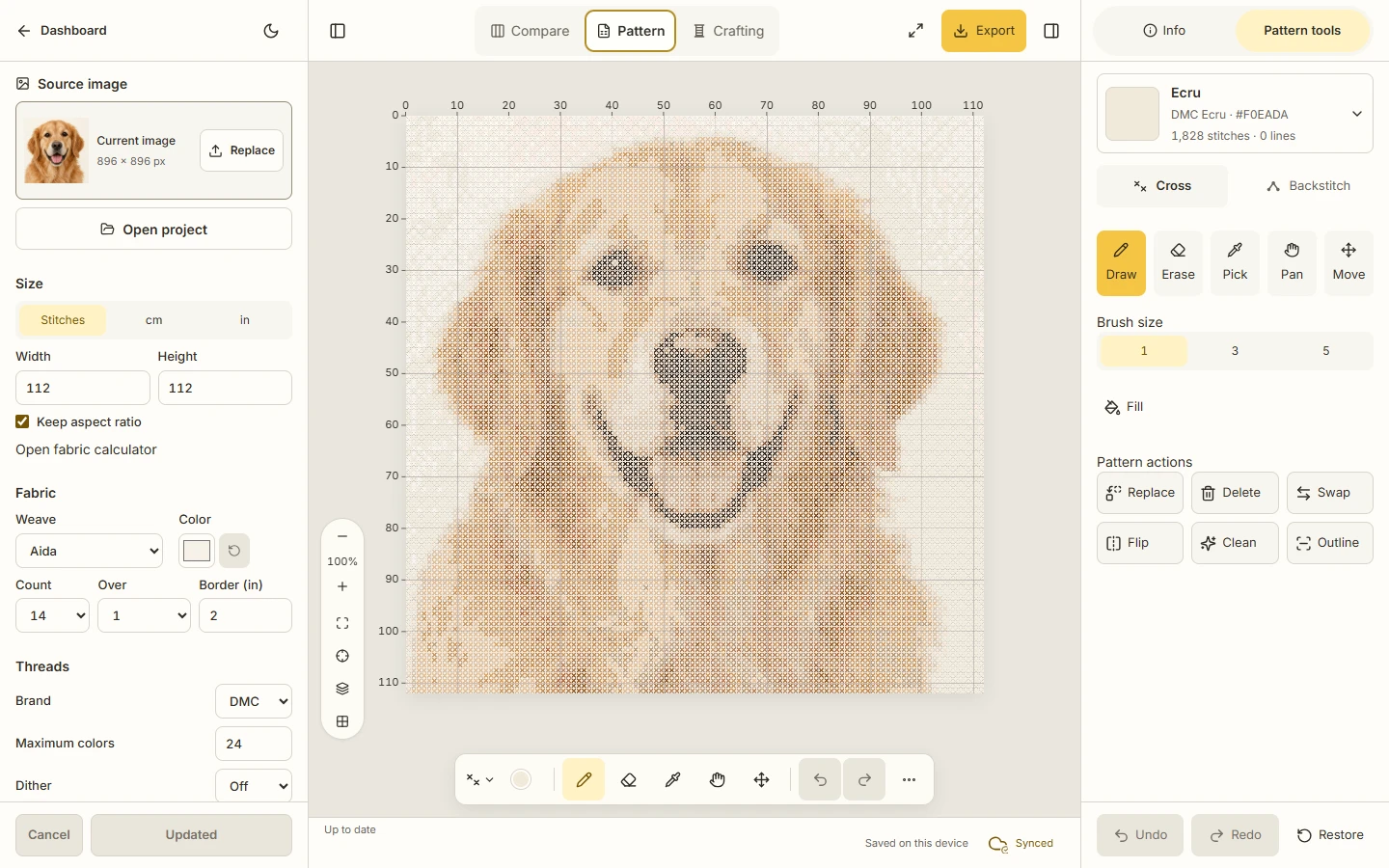
If something does not look right
- Use Undo or Redo in Pattern history for drawing and color edits. Progress history is separate when you later work in Crafting.
- If the selected target is wrong, clear the color operation before Apply; a preview is not a committed edit.
- If a cloud operation is busy, finish or cancel it before opening a project or changing the document. The device copy remains available while the cloud action settles.
Limits to keep in mind
- Crosy supports full Cross and Backstitch data in the validated model. Fractional Cross conventions are outside this workflow.
- A lower color count or fewer stitches is not automatically a better chart. Inspect the photo, board and key together.
- The editor exposes verified DMC choices; it does not promise that screen color exactly matches physical thread.