Dashboard manual · Chapter 7 of 7
Understand account, credits and billing
Read membership, usage, credit history and billing status separately so a plan label never gets confused with an export charge.
In this manual
Before you begin
- Sign in to open Settings and account routes.
- Know whether you are checking balance, a source unlock, a Pro membership or an existing payment record.
- Keep purchase or billing questions inside the signed-in account support channel when a record needs review.
What you will have
You can locate the relevant account fact, understand the 30-credit source unlock and recognize when checkout or billing data is unavailable.
Steps
Read the account card
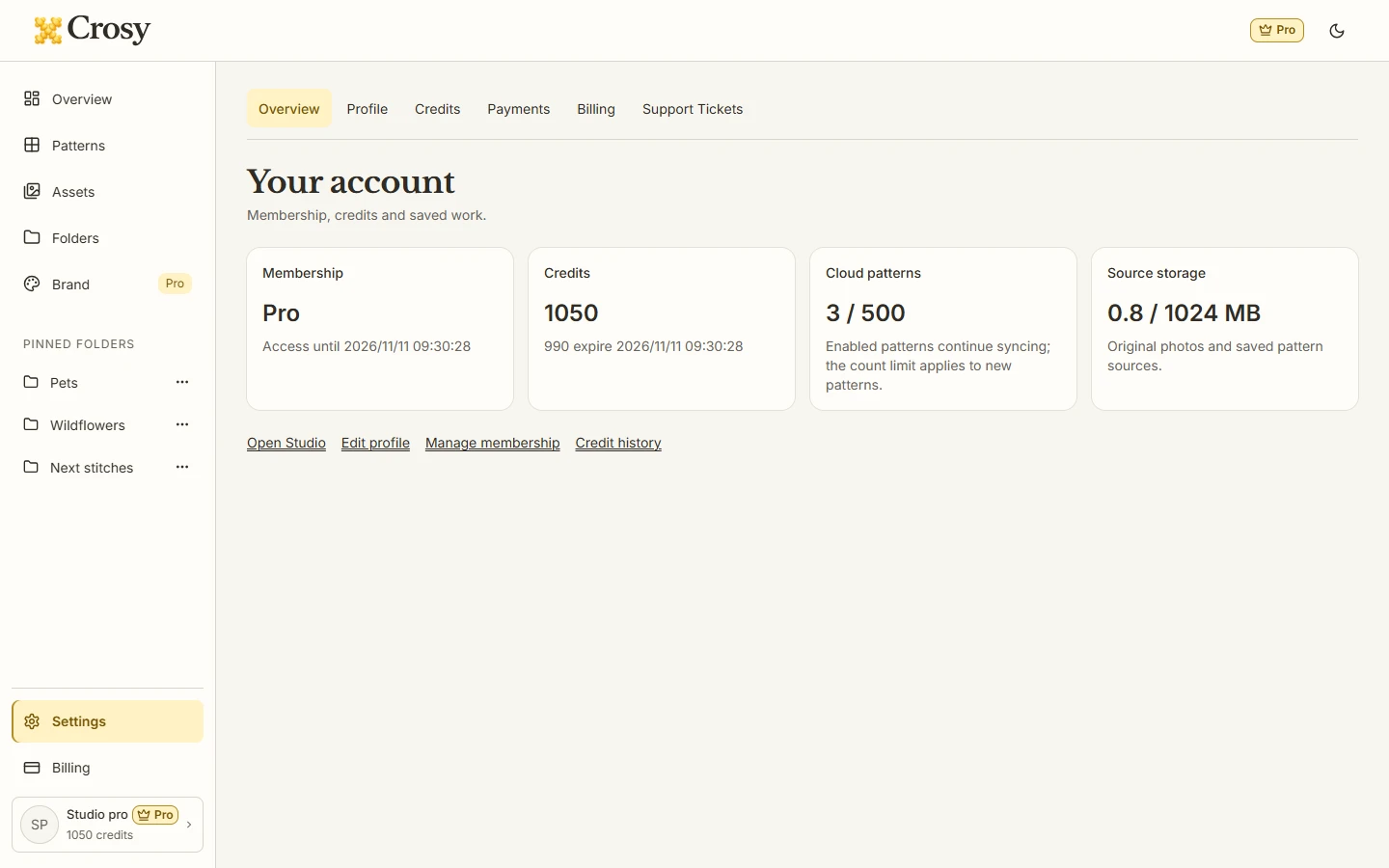
Open Settings overview or the Studio account popup. Read the plan, credits, cloud-pattern usage, original storage and any positive monthly-credit expiry together.
Expected result. Free, Pro, loading and unavailable states stay distinct, and the usage line identifies the affected allowance.
Inspect credit history
Open Credits to see the current balance and credit history. Use the All, grant and consume tabs or search when you need to find a record.
Expected result. The page shows grants, consumption, remaining balance and expiry where the account provides those facts.
Understand the source unlock
Remember that all eight complete formats use one 30-credit unlock per source. Same-source edits and repeat formats cost zero after that unlock; a replaced photo starts a new source.
Expected result. You can distinguish a result charge from Pro membership, cloud storage and free preview/editing.
Review plan quantities
Free starts with 60 welcome credits once. The 30-credit pack is one-time and does not automatically expire. Pro is $9.90 monthly or $99 annually with 990 credits per anchored month; annual payment does not grant twelve months at once.
Expected result. The plan facts explain how credits are granted without implying that buying credits grants Pro or makes Pro downloads free.
Check Billing and Payments separately
Use Billing for subscription status and cancellation information, and Payments for order records and invoices when available. If checkout is unavailable, stop at the account message and use support for a payment question.
Expected result. A billing record, payment order and credit balance remain separate account facts; no action is silently purchased or charged.
See the task
If something does not look right
- If account facts are loading or unavailable, wait for Retry rather than treating an empty balance as zero or a missing plan as Free.
- If a download asks for credits, return to the export confirmation and check the source and balance before accepting the unlock.
- If the configured Creem checkout is unavailable, stop at the account message; do not retry as if a charge happened. For a payment or billing dispute, record the visible order or subscription details and use Support Tickets. Do not paste payment-card details into a ticket.
Limits to keep in mind
- Pro tools and result credits are separate. Clean Apply and Brand require Pro, while complete Pro downloads still use the 30-credit source unlock.
- Monthly Pro credits are tied to the paid period and may show a positive expiry date; this page does not promise a refund, retention window or payment completion.
- Checkout uses Creem only when its configured connection reports readiness. The preview page cannot prove that a production payment route is currently working.